- Python 98.2%
- GLSL 1.6%
- Dockerfile 0.1%
 e18db42ae1
* Update mobject.py * 2 test failed * Update mobject.py * fix set_rgba_array * finish * no errors with cairo so far * SurfaceExample partially works * SquareToCircle works * Update opengl_mobject.py * SurfaceExample works without Textures * More updates * all opengl examples work pefectly * Update opengl_surface.py * fix test case * fix flake8 and refactor code * remove all OpenGLMobject related code * add functions from OpenGL * remove comments * Fix bug |
||
|---|---|---|
| .github | ||
| docker | ||
| docs | ||
| example_scenes | ||
| logo | ||
| manim | ||
| scripts | ||
| tests | ||
| .dockerignore | ||
| .flake8 | ||
| .gitattributes | ||
| .gitignore | ||
| .pylintrc | ||
| .readthedocs.yml | ||
| CODE_OF_CONDUCT.md | ||
| LICENSE | ||
| LICENSE.community | ||
| poetry.lock | ||
| pyproject.toml | ||
| README.md | ||










An animation engine for explanatory math videos
Manim is an animation engine for explanatory math videos. It's used to create precise animations programmatically, as demonstrated in the videos of 3Blue1Brown.
NOTE: This repository is maintained by the Manim Community, and is not associated with Grant Sanderson or 3Blue1Brown in any way (although we are definitely indebted to him for providing his work to the world). If you would like to study how Grant makes his videos, head over to his repository (3b1b/manim). This fork is updated more frequently than his, and it's recommended to use this fork if you'd like to use Manim for your own projects.
Table of Contents:
Installation
Manim requires a few dependencies that must be installed prior to using it. If you want to try it out first before installing it locally, you can do so in our online Jupyter environment.
For the local installation, please visit the Documentation and follow the appropriate instructions for your operating system.
Once the dependencies have been installed, run the following in a terminal window:
pip install manim
Usage
Manim is an extremely versatile package. The following is an example Scene you can construct:
from manim import *


class SquareToCircle(Scene):
    def construct(self):
        circle = Circle()
        square = Square()
        square.flip(RIGHT)
        square.rotate(-3 * TAU / 8)
        circle.set_fill(PINK, opacity=0.5)

        self.play(Create(square))
        self.play(Transform(square, circle))
        self.play(FadeOut(square))
In order to view the output of this scene, save the code in a file called example.py. Then, run the following in a terminal window:
manim example.py SquareToCircle -p -ql
You should see your native video player program pop up and play a simple scene in which a square is transformed into a circle. You may find some more simple examples within this GitHub repository. You can also visit the official gallery for more advanced examples.
Manim also ships with a %%manim IPython magic which allows to use it conveniently in JupyterLab (as well as classic Jupyter) notebooks. See the
corresponding documentation for some guidance and
try it out online.
Command line arguments
The general usage of Manim is as follows:
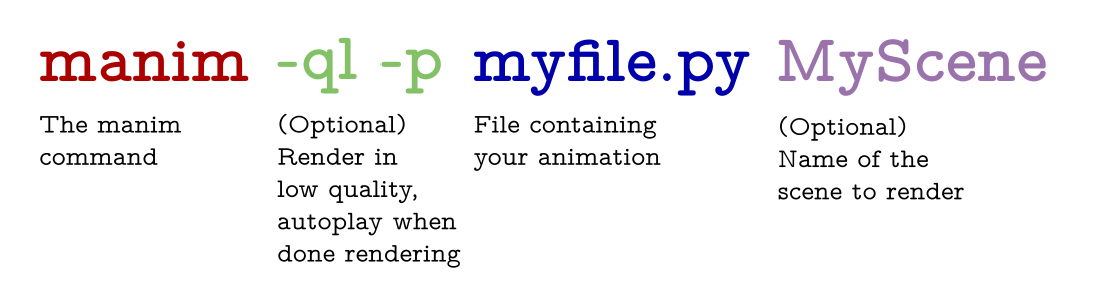
The -p flag in the command above is for previewing, meaning the video file will automatically open when it is done rendering. The -ql flag is for a faster rendering at a lower quality.
Some other useful flags include:
-sto skip to the end and just show the final frame.-n <number>to skip ahead to then'th animation of a scene.-fshow the file in the file browser.
For a thorough list of command line arguments, visit the documentation.
Documentation
Documentation is in progress at ReadTheDocs.
Help with Manim
If you need help installing or using Manim, feel free to reach out to our Discord Server or Reddit Community. If you would like to submit bug report or feature request, please open an issue.
Contributing
Contributions to Manim are always welcome. In particular, there is a dire need for tests and documentation. For contribution guidelines, please see the documentation.
Most developers on the project use Poetry for management. You'll want to have poetry installed and available in your environment. You can learn more poetry and how to use it at its documentation.
Code of Conduct
Our full code of conduct, and how we enforce it, can be read on our website.
License
The software is double-licensed under the MIT license, with copyright by 3blue1brown LLC (see LICENSE), and copyright by Manim Community Developers (see LICENSE.community).