- Python 98.2%
- GLSL 1.6%
- Dockerfile 0.1%
 468929889b
* Add type annotations to `mobject.py` * More work on type annotations for mobject.py * ... * Almost handled all mypy errors * Add the mypy error messages to the lines that trigger them * Use typing.cast to avoid some mypy errors, as suggested by JasonGrace2282 * Used the ruff linter * Fixed one typing issue and added the error descriptions to the source code for the remaning 10 errors * Set the type of the elements in a VGroup to VMobject * Use typing.cast to handle some specific cases. * Code cleaning * Updates * When started to use typing.cast it is needed to import / define certain elements during runtime and not only during type checking * Fix bug introduced with the type annotations. * Made it work again * .. * Fixed more issues. * Code cleanup * Code cleanup. Replace self.lines with self.lines_chars and self.lines_alignment. * Handle slicing when accessing elements inside a VGroup * Fix missing issues. * Silence the last mypy error * Make _Updater, _NonTimeBasedUpdater and _TimeBasedUpdater private. * Replace | with Union[...] in one location * Move import of Union * [pre-commit.ci] auto fixes from pre-commit.com hooks for more information, see https://pre-commit.ci * Remove comment that is no longer relevant * Overload the auto_zoom method in MovingCamera to provide better type hinting * Codecleanup * Code cleanup * Renamed lines_alignment to lines_alignments and added a TODO about a future cleanup task * More code cleanup * Update manim/mobject/matrix.py Co-authored-by: Francisco Manríquez Novoa <49853152+chopan050@users.noreply.github.com> * [pre-commit.ci] auto fixes from pre-commit.com hooks for more information, see https://pre-commit.ci * Addressing multiple comments from Chopan50 * Implementing more suggestions from Chopan50 * More suggestions by Chopan50 * ... * More renaming and code cleanup, as suggested by Chopan50 * Restructure code * anim_args * Update typing in vector_space_scene * Implemented a number of suggestions from chopan50 * Make a list of faces with the type list[ThreeDVMobject] * Ensure to return a VGroup if slicing is used. * Revert back to the original code in text_mobject.py * [pre-commit.ci] auto fixes from pre-commit.com hooks for more information, see https://pre-commit.ci * Add the propagate_colors option to Mobject as it is used by VMobject. Replace Self with _UpdateBuilder * Simplify code --------- Co-authored-by: pre-commit-ci[bot] <66853113+pre-commit-ci[bot]@users.noreply.github.com> Co-authored-by: Francisco Manríquez Novoa <49853152+chopan050@users.noreply.github.com> |
||
|---|---|---|
| .github | ||
| docker | ||
| docs | ||
| example_scenes | ||
| logo | ||
| manim | ||
| scripts | ||
| tests | ||
| .codecov.yml | ||
| .codespell_ignorewords | ||
| .codespellrc | ||
| .dockerignore | ||
| .flake8 | ||
| .git-blame-ignore-revs | ||
| .gitattributes | ||
| .gitignore | ||
| .pre-commit-config.yaml | ||
| .pylintrc | ||
| .readthedocs.yml | ||
| CITATION.cff | ||
| CODE_OF_CONDUCT.md | ||
| CONTRIBUTING.md | ||
| crowdin.yml | ||
| lgtm.yml | ||
| LICENSE | ||
| LICENSE.community | ||
| mypy.ini | ||
| pyproject.toml | ||
| README.md | ||
| uv.lock | ||









An animation engine for explanatory math videos
Manim is an animation engine for explanatory math videos. It's used to create precise animations programmatically, as demonstrated in the videos of 3Blue1Brown.
Note
The community edition of Manim (ManimCE) is a version maintained and developed by the community. It was forked from 3b1b/manim, a tool originally created and open-sourced by Grant Sanderson, also creator of the 3Blue1Brown educational math videos. While Grant Sanderson continues to maintain his own repository, we recommend this version for its continued development, improved features, enhanced documentation, and more active community-driven maintenance. If you would like to study how Grant makes his videos, head over to his repository (3b1b/manim).
Table of Contents:
Installation
Caution
These instructions are for the community version only. Trying to use these instructions to install 3b1b/manim or instructions there to install this version will cause problems. Read this and decide which version you wish to install, then only follow the instructions for your desired version.
Manim requires a few dependencies that must be installed prior to using it. If you want to try it out first before installing it locally, you can do so in our online Jupyter environment.
For local installation, please visit the Documentation and follow the appropriate instructions for your operating system.
Usage
Manim is an extremely versatile package. The following is an example Scene you can construct:
from manim import *


class SquareToCircle(Scene):
    def construct(self):
        circle = Circle()
        square = Square()
        square.flip(RIGHT)
        square.rotate(-3 * TAU / 8)
        circle.set_fill(PINK, opacity=0.5)

        self.play(Create(square))
        self.play(Transform(square, circle))
        self.play(FadeOut(square))
In order to view the output of this scene, save the code in a file called example.py. Then, run the following in a terminal window:
manim -p -ql example.py SquareToCircle
You should see your native video player program pop up and play a simple scene in which a square is transformed into a circle. You may find some more simple examples within this GitHub repository. You can also visit the official gallery for more advanced examples.
Manim also ships with a %%manim IPython magic which allows to use it conveniently in JupyterLab (as well as classic Jupyter) notebooks. See the
corresponding documentation for some guidance and
try it out online.
Command line arguments
The general usage of Manim is as follows:
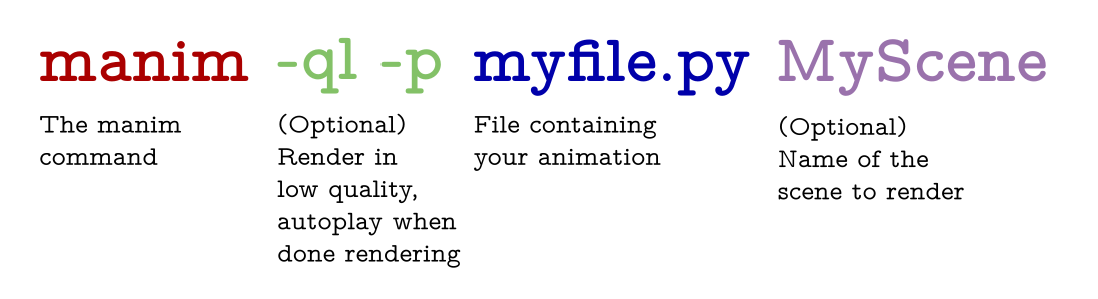
The -p flag in the command above is for previewing, meaning the video file will automatically open when it is done rendering. The -ql flag is for a faster rendering at a lower quality.
Some other useful flags include:
-sto skip to the end and just show the final frame.-n <number>to skip ahead to then'th animation of a scene.-fshow the file in the file browser.
For a thorough list of command line arguments, visit the documentation.
Documentation
Documentation is in progress at ReadTheDocs.
Docker
The community also maintains a docker image (manimcommunity/manim), which can be found on DockerHub.
Instructions on how to install and use it can be found in our documentation.
Help with Manim
If you need help installing or using Manim, feel free to reach out to our Discord Server or Reddit Community. If you would like to submit a bug report or feature request, please open an issue.
Contributing
Contributions to Manim are always welcome. In particular, there is a dire need for tests and documentation. For contribution guidelines, please see the documentation.
However, please note that Manim is currently undergoing a major refactor. In general, contributions implementing new features will not be accepted in this period. The contribution guide may become outdated quickly; we highly recommend joining our Discord server to discuss any potential contributions and keep up to date with the latest developments.
Most developers on the project use uv for management. You'll want to have uv installed and available in your environment.
Learn more about uv at its documentation and find out how to install manim with uv at the manim dev-installation guide in the manim documentation.
How to Cite Manim
We acknowledge the importance of good software to support research, and we note that research becomes more valuable when it is communicated effectively. To demonstrate the value of Manim, we ask that you cite Manim in your work. Currently, the best way to cite Manim is to go to our repository page (if you aren't already) and click the "cite this repository" button on the right sidebar. This will generate a citation in your preferred format, and will also integrate well with citation managers.
Code of Conduct
Our full code of conduct, and how we enforce it, can be read on our website.
License
The software is double-licensed under the MIT license, with copyright by 3blue1brown LLC (see LICENSE), and copyright by Manim Community Developers (see LICENSE.community).